EDGE Copy and Paste Tool
This application runs as a small icon in the bottom right-hand side of your taskbar.
User experience may depend upon the DMS configurations. Please contact tech support if you encounter any issues.
It allows an EDGE user to copy displayed text from various windows. There are several scripts created to extract text from
different applications and for various scenarios. A user can select a specific script and use the script to capture text from an appilcation,
have it formatted and then pasted into an open EDGE Shop Notes window all with just a single click.
The EDGE Copy and Paste Tool currently has support for the following Dealer Management Systems:
- UCS
- Reynolds and Reynolds (ERA)
- Automate
- ADP Reflections
If you are using ADP Drive or Automate you will be prompted to install WinPCap (for which you will need administrator privledges).
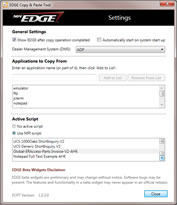
Once installed, ECPT will show an icon in your task bar from which you can access it's menu. In the settings window, specify the default copy script to use and the title of the application you wish to copy from.
Applications that are currently running will be listed in the menu - just select the window you wish to copy from to execute the copy operation!

Downloading Instructions
Click on the link above to download and automatically install ECPT. Once the installation completes, a small icon will appear in your system tray (in the bottom right-hand side of your taskbar) and will be ready to use. Right click this to bring up a menu with all the options of what can be done

Randy Naviaux
Product Manager